I was struggling for more than a year now, that some folders on windows 11 was marked as read only and some web based applications had problem, to delete folders. I’ve tried many fixes but nothing really worked. The other problem was when I unzipped a zip created on local win machine to the remote linux server, the folders got permissions 555 but I needed 755 so some extra commands were needed.
Changing the read only attribute on pic below had no impact and it was all the time reverted back immediately after applying it.
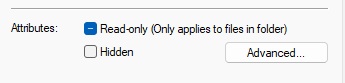
However today I was lucky and found out a solution. Check the permissions in Total Commander. If you can see r in attributes column, the folder is read only. This setting is mostly ignored by windows and windows apps, however some application may check this attribute and prevent deleting folders. I had a problem while using WAMP that localhost could not delete any folder using php. Now it works!
So navigate to your folder in Total Commander and check the attributes column.
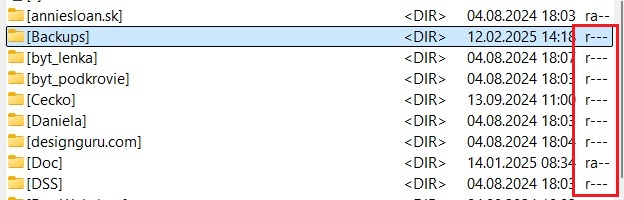
Select the folder and click Files > Change Attributes. Then unchek the read only and select Recourse Directories if desired. I really don’t know what command is beeing executed under the hood, but IT WORKS and solved my problem.
